Home walkthrough
Doors, ground-floor windows, garage access, hallways and stairways are reviewed so the system matches the actual property, not a standard list.

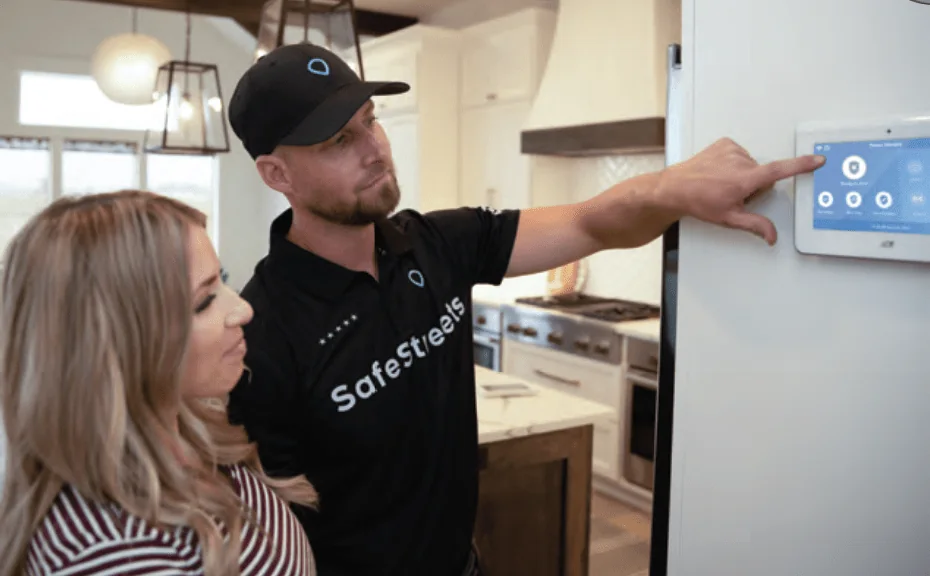
A SafeStreets technician plans placement around your home, installs and tests the equipment, connects the app and explains the system before leaving.
*Minimum $199 installation charge required for California. Monitoring agreement required. Other terms and eligibility requirements apply.
For new ADT-monitored system quotes only. Already an ADT customer? Please contact ADT directly for service, billing or account support.
Free quote · No obligation · About 60 seconds
For new system quotes only. Already have ADT? Please contact ADT directly for service or account support.
Professional installation is more than attaching sensors to doors. The technician looks at how the household uses the property, places devices where they can work, connects the system and makes sure you know what happens next.
Doors, ground-floor windows, garage access, hallways and stairways are reviewed so the system matches the actual property, not a standard list.
Entry sensors, motion detection, cameras, the control panel and eligible safety or smart-home devices are placed with everyday movement, pets, power and connectivity in mind.
Installed equipment is connected and checked before the visit ends: sensors, camera views, device communication, system status and eligible monitoring connections.
Where supported, you are shown how to arm and disarm, review alerts, check cameras, manage access and use connected devices from the app.
Routine use, alarm procedures, basic troubleshooting and who to contact for support are explained before the technician leaves.
Installed equipment, monitoring and agreement details, any local permit responsibility and next steps are confirmed. Keep the provider documents handy.
Exact steps and timing vary by property, ZIP code, equipment, eligibility, provider review and appointment availability. A typical professionally installed system follows four stages.
A representative reviews the home, service address, equipment interests, installation availability, pricing, promotion eligibility, monitoring plan and agreement terms.
The installer reviews entry points and the way the household uses the property. This can reveal coverage needs that are easy to miss when choosing equipment online.
The technician installs the approved equipment, connects supported devices, configures the panel and app, and works through any setup issues found during the visit.
Devices are checked and you receive a walkthrough. Ask questions until you understand everyday use, alerts, alarm response and support.
The walkthrough is the best time to try the everyday controls with someone who can answer questions. Available features depend on the equipment and service selected.

The useful comparison is not whether you can mount a sensor yourself. It is who plans the coverage, handles setup and testing, solves connection problems and explains how the complete system works.
Practical rule: compare the complete offer — equipment, installation, monitoring, agreement terms, support and total cost. A low installation price alone does not show whether two systems provide the same service.
Open only the topics you want to explore. The quote confirms the specifics for your home.
The right locations depend on the home. A front door is obvious, but secondary doors, garage access, ground-floor windows, side passages and interior routes may also matter. Camera placement must consider the intended view, lighting, height, Wi-Fi or connection requirements, power, privacy and local rules.
Motion detectors are generally planned around movement through important interior areas; homes with pets may need different positioning or settings. Smoke, heat, carbon monoxide, flood, smart-lock, thermostat and other supported devices each have their own placement and connection requirements.
The goal is not the greatest possible number of devices. It is sensible coverage around the layout and the household’s priorities.
Make sure an authorized adult is available for the appointment and provider paperwork. Clear reasonable access to doors, windows, the proposed panel location, router, outlets and other installation areas.
Know your Wi-Fi name and password if supported cameras, app features or connected devices need them. List the entry points, rooms, outdoor views and safety concerns you want reviewed, and think about how children, pets, caregivers or frequent visitors will use the system.
Ask whether your city, county, landlord or homeowners association requires permission or an alarm permit, and review the approved quote, monitoring agreement, installation charge, promotion conditions and equipment list. Do not make structural changes or buy extra equipment based only on general website information.
For a practical pre-appointment list covering power, Wi-Fi, apps, access, pets, permits and paperwork, use our home security installation checklist.
Equipment: ask for the approved equipment list and identify optional devices, substitutions, promotion conditions or extra charges. Confirm what you own, lease or must return under the agreement.
Cost: current offer language on this site references a customer installation charge starting at $99 with a required monitoring agreement for qualifying customers. Final pricing, taxes, fees, equipment, eligibility and terms are confirmed through provider review. See the full cost guide.
Appointment length: a small sensor system and a larger system with cameras or connected devices do not require the same work. Ask for the expected window and stay available for the final walkthrough. For a fuller breakdown of the factors that affect timing, read how long home security installation takes.
Availability: professional installation availability varies by location, property type, technician coverage, eligibility and provider review. A quote request confirms whether the address is currently serviceable.
Permit and registration rules vary by city and county. Ask who is responsible for checking, applying, paying any fee and keeping the permit current; verify local requirements rather than assuming one rule applies everywhere.
Confirm how eligible alarm events are handled under the selected monitoring plan, how the monitoring center may contact you, which emergency contacts are used, and what household members should do after an accidental alarm. For a fuller explanation of the response process, compare monitored home security systems and professional monitoring.
Professional installation does not guarantee that a burglary, fire, carbon monoxide event, flood, equipment failure or other loss will not occur. Review the provider’s agreement, limitations and operating instructions.
Exact services depend on the property, equipment, monitoring plan, eligibility and provider terms.
Request a free quote through SafeStreets, an ADT Authorized Provider. A representative may follow up to confirm availability, eligibility, equipment, professional installation, monitoring options and applicable terms for your ZIP code.
Check Installation Availability Call 855-532-1019